1514-03

Product Support Page

5-button 2-Way Controller – 433Mhz/ASK, Color LCD, Rechargeable

Suggested Retail Price:
$84.95

IMPORTANT NOTE: This guide only shows operations supported by all systems using this remote. For all operations and programming guides, see the guide for your system model number. If unsure, contact us or your Omega dealer.

IMPORTANT: Remote learning methods can vary based on the host system. Please look up the guide for your system model number for the correct process. If you cannot identify your system model number, you can try one of the below possible methods:

  1. REQUIREMENTS:

      1. Perform steps 1 & 2 within 10 seconds.
      2. If 10 seconds passes with no activity, the system will auto-exit remote learning.
      3. You must have all remotes to be learned present. Once a remote is learned, all previously learned remotes are deleted.

    STEPS:

    1. Turn ignition on (do not crank the engine)
      1. All your dash lights and gauges should turn on with the engine off.
      2. For push-button vehicles, tap 2x without pressing the brake. This may vary on some vehicles.
    2. Tap valet/programming button 5 times
      1. The valet button is either built into your antenna module or mounted in your dash. If you’re unsure, contact your local Excalibur dealer.
      2. The system will confirm with a long siren chirp / horn honk. Also, the status light will flash rapidly.
    3. Tap the lock button on your remote.
      1. 1-button fobs: tap the start button
      2. NOTE: do not hold the button, some remotes do not transmit until your release the button.
      3. The system will confirm with a short siren chirp, horn honk, and parking light flash.
    4. Repeat Step 3 for any additional remotes.
    5. Turn the ignition off or wait for your system to exit learn mode.
    1. Turn the key on 5 times
    2. Press tx button super quick
2-Way Only Remote Functions

REQUIREMENTS:

  1. Make sure your remote battery is charged. 

ACTION:

  • Press and hold the “P” button then tap trunk.
    • Each tap of the trunk button will toggle between Beep/Vibrate/Both/Silent.
  • Release the “P” button once you have the desired selection.

2-WAY REMOTE CONFIRMATION:

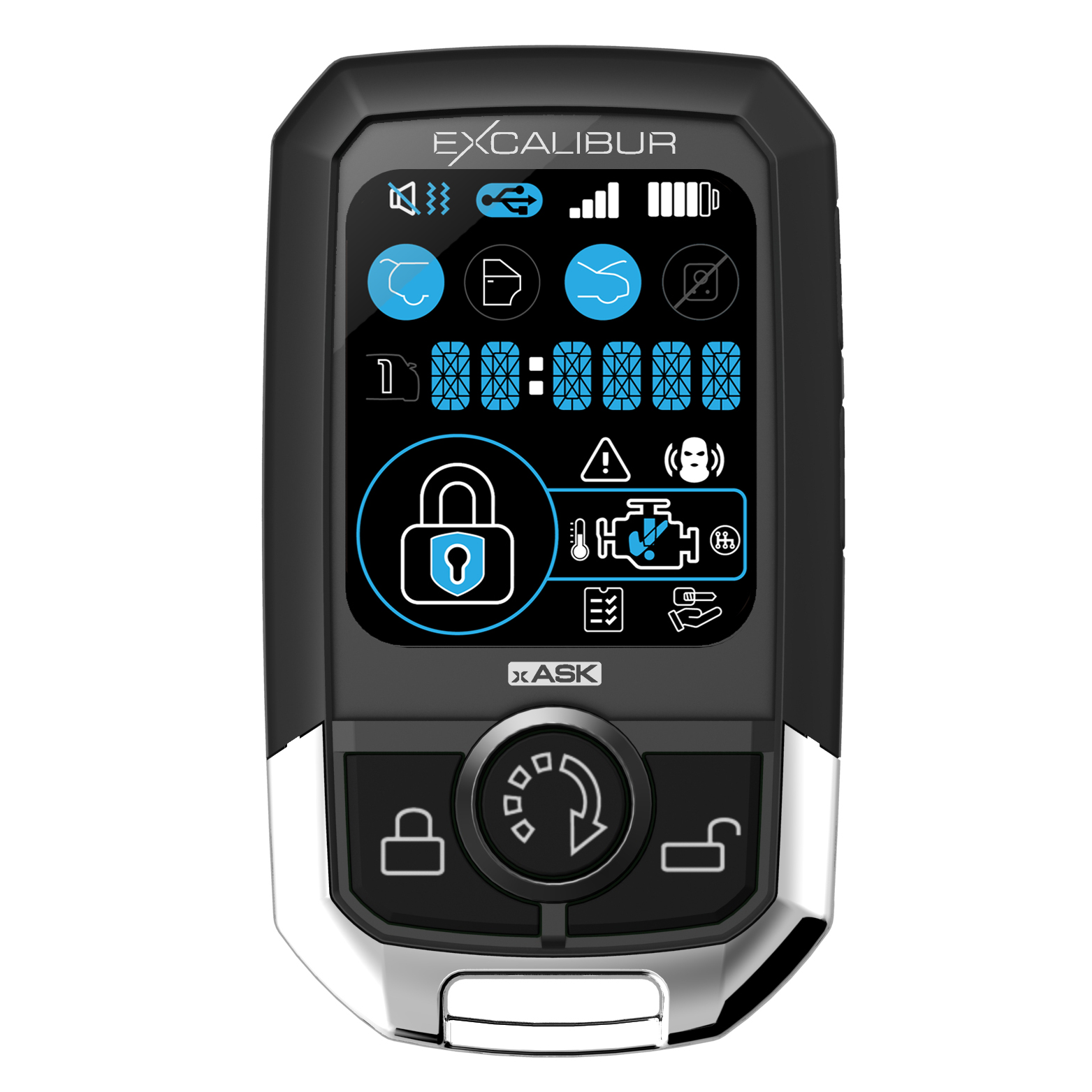
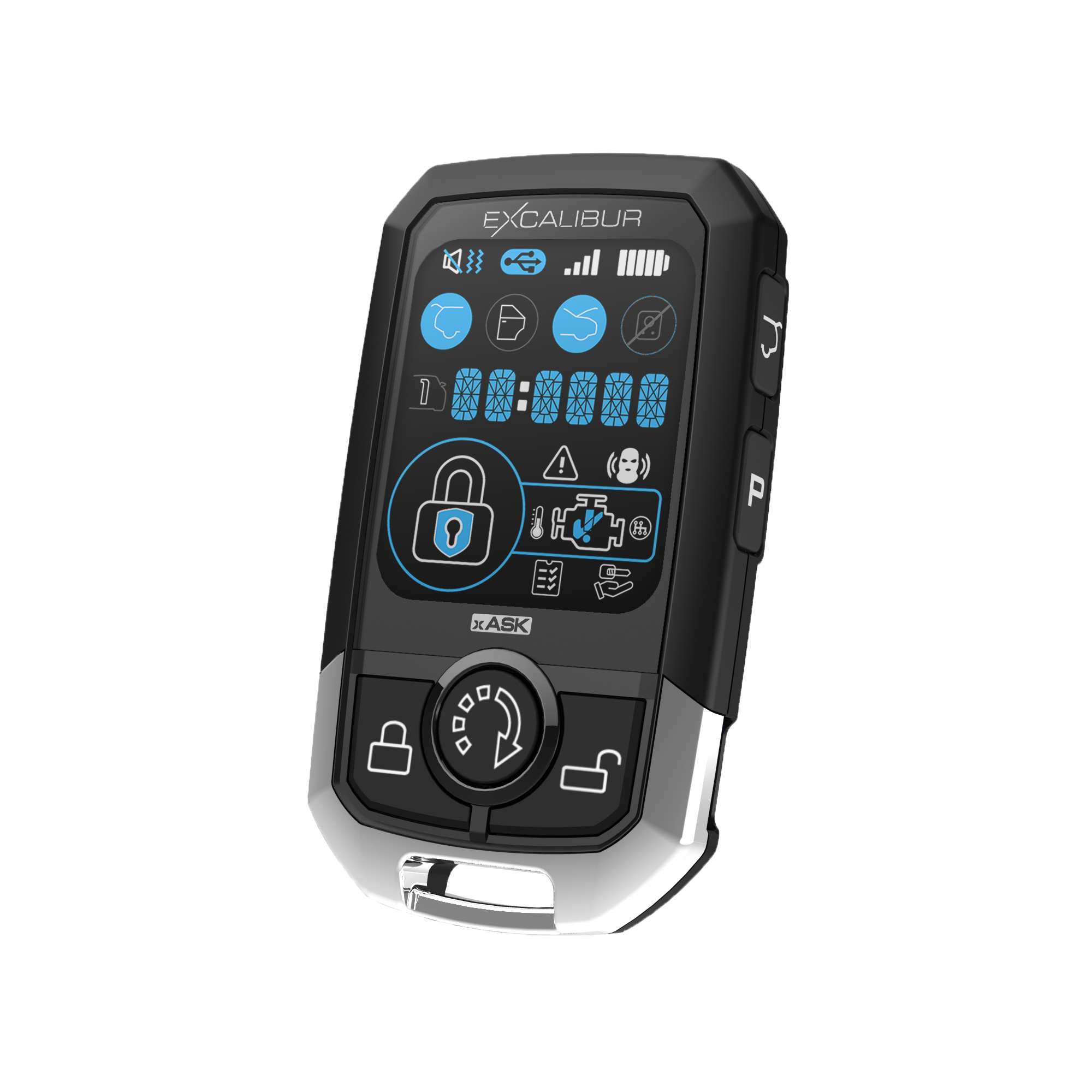
  • LCD/Screen Confirming: Icons in the top left corner will switch between speaker, wavy lines, or both to indicate current setting.

This feature will disable all buttons on the remote to avoid accidental activation.

REQUIREMENTS:

  1. Make sure your remote battery is charged. 

ACTION:

  • Hold the “P” and Lock button for 2+ seconds.
  • Repeat to exit button lock mode

2-WAY REMOTE CONFIRMATION:

  • The message center (clock digits) will show “LOCKED” upon entering and every time you press a button afterwards.

REQUIREMENTS:

  1. Make sure your remote battery is charged. 

ACTION:

  • Tap the “P” button then within 2 seconds tap the start button.

2-WAY REMOTE CONFIRMATION:

  • LCD/Screen Confirming: The time clock will change to display the current temperature of the interior of the vehicle. 

REQUIREMENTS:

  1. Make sure your remote battery is charged. 

ACTION:

  • Tap the “P” button then within 2 seconds tap the unlock button.

2-WAY REMOTE CONFIRMATION:

  • LCD/Screen Confirming: The time clock will change to display CAR1 or CAR2 and the multi-car icon will also display the current selected vehicle profile. 

REQUIREMENTS:

  1. Make sure your remote battery is charged. 

ACTION:

  • Tap the lock button to lock/arm the system then within 3 seconds tap the lock button again.

2-WAY REMOTE CONFIRMATION:

  • LCD/Screen Confirming: The time display will change to 00:00 P and begin to keep time in hours and minutes.
  • Press “P” to wake the screen and toggle between time of day and parking timer.

REQUIREMENTS:

  1. Make sure your remote battery is charged. 

ACTION:

  • To turn the remote On.
    • Press and hold the Start button for 3 seconds.
  • To turn the remote Off.
    • Press and hold the  “P” and Start button for 3 seconds.

2-WAY REMOTE CONFIRMATION:

  • Turning On.
    • The LCD/Screen  with display the firmware version number and QR code and the power up melody will play.
  • Turning On.
    • The LCD/Screen  with turn off and the power down melody will play.

REQUIREMENTS:

  1. Make sure your remote battery is charged. 

ACTION:

  • Press and hold the “P” button for 3 seconds to enter programming.
    •  Press the LOCK or UNLOCK button to select 12 or 24 hour
      • Press “P” to advance.
    • Press LOCK or UNLOCK button to adjust the hours.
      • Press “P” to advance.
    • Press LOCK or UNLOCK button to adjust the minutes.
      • Press “P” to advance.
    • Press LOCK or UNLOCK button to select remote start melody.
      • Press “P” to advance.
    • Press LOCK or UNLOCK button to select remote start  shut down melody.
      • Press “P” to advance.
    • Press LOCK or UNLOCK button to select Celsius or Fahrenheit temperature display.
      • Press “P” to advance to firmware version and guide QR code.
      • Press “P” again to repeat menu.
  • Do not press any buttons for 5 seconds to return to operation.
  •  

REQUIREMENTS:

  1. Make sure your remote battery is charged. 

ACTION:

  • Tap the “P” button then within 2 seconds tap the lock button.

2-WAY REMOTE CONFIRMATION:

  • LCD/Screen Confirming: All icons (padlock, door, sensor, hood, etc.,.) will update to show the current system status.

Standard Remote Functions

REQUIREMENTS:

  1. Make sure you are within range of your vehicle.
  2. 2-way controllers only: Make sure you are in the correct vehicle profile (CAR1/CAR2)
  3. Make sure your remote battery is in good working order (the light or screen on the remote turns on when you tap any remote button).

ACTION:

  • Tap the lock button on your remote.
    • Do not hold the button, some remotes do not transmit until your release the button.

SYSTEM/VEHICLE CONFIRMATION: 

  • The vehicle/system will confirm 1 siren chirp, horn honk, and parking light flash.
  • If equipped with an alarm, the alarm will also arm.

2-WAY REMOTE CONFIRMATION:

  • LCD/Screen Confirming: The LOCK icon will illuminate confirm the command was received. It may also beep/vibrate depending on your confirmation settings. 
  • LED Confirming: The LED/Light for the LOCK button will flash to confirm. It may also beep/vibrate depending on your confirmation settings. 

REQUIREMENTS:

  1. Make sure you are within range of your vehicle.
  2. 2-way controllers only: Make sure you are in the correct vehicle profile (CAR1/CAR2)
  3. Make sure your remote battery is in good working order (the light or screen on the remote turns on when you tap any remote button).

ACTION:

  • Tap the trunk button then tap the lock button on your remote within 5 seconds.
    • Do not hold the button, some remotes do not transmit until your release the button.

SYSTEM/VEHICLE CONFIRMATION: 

  • The vehicle/system will confirm with 1 parking light flash.

2-WAY REMOTE CONFIRMATION:

  • LCD/Screen Confirming: The LOCK icon will illuminate confirm the command was received. No shield will be displayed in the LOCK icon. 
  • LED Confirming: The LED/Light for the LOCK button will flash to confirm.  

REQUIREMENTS:

  1. Make sure you are within range of your vehicle.
  2. 2-way controllers only: Make sure you are in the correct vehicle profile (CAR1/CAR2)
  3. Make sure your remote battery is in good working order (the light or screen on the remote turns on when you tap any remote button).

ACTION:

  • Tap the unlock button on your remote.
    • In some application the first unlock operation will unlock the drivers door only and a seconds tap of the unlock button will unlock all doors.
    • Do not hold the button, some remotes do not transmit until you release the button.

SYSTEM/VEHICLE CONFIRMATION: 

  • The vehicle/system will confirm 2 siren chirps, horn honk, and parking light flashes.
  • If equipped with an alarm, the alarm will also disarm.

2-WAY REMOTE CONFIRMATION:

  • LCD/Screen Confirming: The UNLOCK icon will illuminate confirm the command was received. It may also beep/vibrate depending on your confirmation settings. 
  • LED Confirming: The LED/Light for the UNLOCK button will flash to confirm. It may also beep/vibrate depending on your confirmation settings. 

REQUIREMENTS:

  1. Make sure you are within range of your vehicle.
  2. 2-way controllers only: Make sure you are in the correct vehicle profile (CAR1/CAR2)
  3. Make sure your remote battery is in good working order (the light or screen on the remote turns on when you tap any remote button).

ACTION:

  • Tap the trunk button twice then tap lock or unlock on your remote.
    • Do not hold the button, some remotes do not transmit until your release the button.

SYSTEM/VEHICLE CONFIRMATION: 

  • The vehicle/system will flash the parking lights.
  • If equipped with an alarm, the alarm will also arm or disarm.

2-WAY REMOTE CONFIRMATION:

  • LCD/Screen Confirming: The LOCK or UNLOCK icon will illuminate confirm the command was received.  
  • LED Confirming: The LED/Light for the LOCK or UNLOCK button will flash to confirm.  

REQUIREMENTS:

  1. Make sure you are within range of your vehicle.
  2. 2-way controllers only: Make sure you are in the correct vehicle profile (CAR1/CAR2)
  3. Make sure your remote battery is in good working order (the light or screen on the remote turns on when you tap any remote button).

ACTION:

  • Press and hold the trunk button on your remote for 3 seconds.

SYSTEM/VEHICLE CONFIRMATION: 

  • The vehicle/system will confirm 2 siren chirps, horn honk, and parking light flash.
  • If programmed, the system will also unlock the doors.

2-WAY REMOTE CONFIRMATION:

  • LCD/Screen Confirming: The time display will change to CH2 to confirm the command was received. It may also beep/vibrate depending on your confirmation settings. 
  • LED Confirming: The LED/Light for the TRUNKK button will flash to confirm. It may also beep/vibrate depending on your confirmation settings. 

REQUIREMENTS:

  1. Make sure you are within range of your vehicle.
  2. 2-way controllers only: Make sure you are in the correct vehicle profile (CAR1/CAR2)
  3. Make sure your remote battery is in good working order (the light or screen on the remote turns on when you tap any remote button).

ACTION:

  • Within 5 seconds tap the start button 2 times on your remote.
    • Do not hold the button, some remotes do not transmit until your release the button.
    • 2 times is the default but systems can be programmed for 1 tap or hold for 2 seconds.

SYSTEM/VEHICLE CONFIRMATION: 

  • The vehicle/system will confirm with 1 parking light flash.
  • The vehicle will start between 1 to 30 seconds depending on system configuration.

2-WAY REMOTE CONFIRMATION:

  • LCD/Screen Confirming: The ENGINE icon will illuminate with a check mark to confirm the command was received. It may also play the start melody/vibrate depending on your confirmation settings.
    • Once successful engine running conditions have been meet the time display will switch to display the remaining remote start run time. Press the “P” button to switch between time of day and engine run time. When 1 minute is remaining the time display will begin to flash. At 30 seconds the time display will flash Yellow.
  • LED Confirming: The LED/Light for the START button will flash to confirm. It may also play the start melody/vibrate depending on your confirmation settings. 
    • Once successful engine running conditions have been meet the LED/Lights will begin to flash every 5 seconds representing remaining run time. All 4 LED/Lights = 75% to 100% runtime remaining. 3 LED/Lights = 50% to 74% runtime remaining. 2 LED/Lights = 25% to 49% runtime remaining. 1 LED/Light = 24% to 1% runtime remaining. When 1 minute is remaining the remote will sound a warning and the START LED/Light will flash every second.

REQUIREMENTS:

  1. Make sure you are within range of your vehicle.
  2. 2-way controllers only: Make sure you are in the correct vehicle profile (CAR1/CAR2)
  3. Make sure your remote battery is in good working order (the light or screen on the remote turns on when you tap any remote button).

ACTION:

  • Tap the unlock, then lock, then start button on your remote within 5 seconds.
    • Do not hold the button, some remotes do not transmit until your release the button.

SYSTEM/VEHICLE CONFIRMATION: 

  • The vehicle/system will confirm with 1 chirp when locking/arming with a parking light flash then another chirp and parking light flash to confirm autostart has been engaged.

2-WAY REMOTE CONFIRMATION:

  • LCD/Screen Confirming: When autostart has been engaged a thermometer icon will illuminate next to the engine icon.
  • LED Confirming:   

REQUIREMENTS:

  1. Make sure you are within range of your vehicle.
  2. 2-way controllers only: Make sure you are in the correct vehicle profile (CAR1/CAR2)
  3. Make sure your remote battery is in good working order (the light or screen on the remote turns on when you tap any remote button).
  4. Alarm related functions must be enabled/installed on “RS” models. They are OFF by default. 

ACTION:

  • Within 5 seconds tap the lock button then the trunk button on your remote.
    • Do not hold the button, some remotes do not transmit until your release the button.

SYSTEM/VEHICLE CONFIRMATION: 

  • The vehicle/system will confirm 1 siren chirp/horn honk when armed then 1 more siren chirp/horn honk when the sensor is bypassed.

2-WAY REMOTE CONFIRMATION:

  • LCD/Screen Confirming: The LOCK icon will illuminate confirm the command was received. The sensor icon will be grayed out when the bypass command is received. It may also beep/vibrate depending on your confirmation settings. 
  • LED Confirming: The LED/Light for the LOCK button will flash to confirm. All 4 LED/Lights will flash once the bypass command is received. It may also beep/vibrate depending on your confirmation settings.

REQUIREMENTS:

  1. Make sure you are within range of your vehicle.
  2. 2-way controllers only: Make sure you are in the correct vehicle profile (CAR1/CAR2)
  3. Make sure your remote battery is in good working order (the light or screen on the remote turns on when you tap any remote button).

ACTION:

  • Channel #4: Tap the lock and trunk button together.
    • Hold the lock and trunk button together to activate output for as long as you hold the buttons.
  • (2-way only) Channel #4: Tap “P” 2 times then tap trunk.
    • Hold the trunk button to activate output for as long as you hold the buttons.
  • Channel #5: Tap the unlock and start button together.
    • Hold the unlock and start button together to activate output for as long as you hold the buttons.
  • (2-way only) Channel #5: Tap “P” 3 times then tap trunk.
    • Hold the trunk button to activate output for as long as you hold the buttons.
  • Outputs can be programmed for single pulse/latched or may control vehicle functions via a data module, consult  the system configuration or your installer for further details.
    • If configured as a latched output repeat the activation process to turn the output off, turning the vehicle ignition on will also turn off any latched auxiliary outputs.

SYSTEM/VEHICLE CONFIRMATION: 

  • The vehicle/system response will very depending upon what outputs are wired/configured to control. 

2-WAY REMOTE CONFIRMATION:

  • LCD/Screen Confirming: The time display will change to CH4 or CH5 depending upon the button configuration used.
  • LED Confirming:   

REQUIREMENTS:

  1. Make sure you are within range of your vehicle.
  2. 2-way controllers only: Make sure you are in the correct vehicle profile (CAR1/CAR2)
  3. Make sure your remote battery is in good working order (the light or screen on the remote turns on when you tap any remote button).

ACTION:

  • Tap the lock button, then the unlock button, then trunk and start buttons together on your remote within 5 seconds.
    • Do not hold the button, some remotes do not transmit until your release the button.
    • Repeat this process to exit valet mode.

SYSTEM/VEHICLE CONFIRMATION: 

  • The vehicle/system will confirm lock and unlock operation normally with 1 additional chirp and parking light flash when entering valet mode.
  • The status LED/light will turn ON solid when entering valet mode or turn OFF when exiting valet mode. 

2-WAY REMOTE CONFIRMATION:

  • LCD/Screen Confirming: The valet icon (hand and key) in the bottom right corner will illuminate when entering valet mode or turn off when exiting valet mode.
  • LED Confirming:   

  1. AL-1880-3D

    1/4 Mile | 5-Button Color LCD Rechargeable 2-Way | Remote Start And Security System

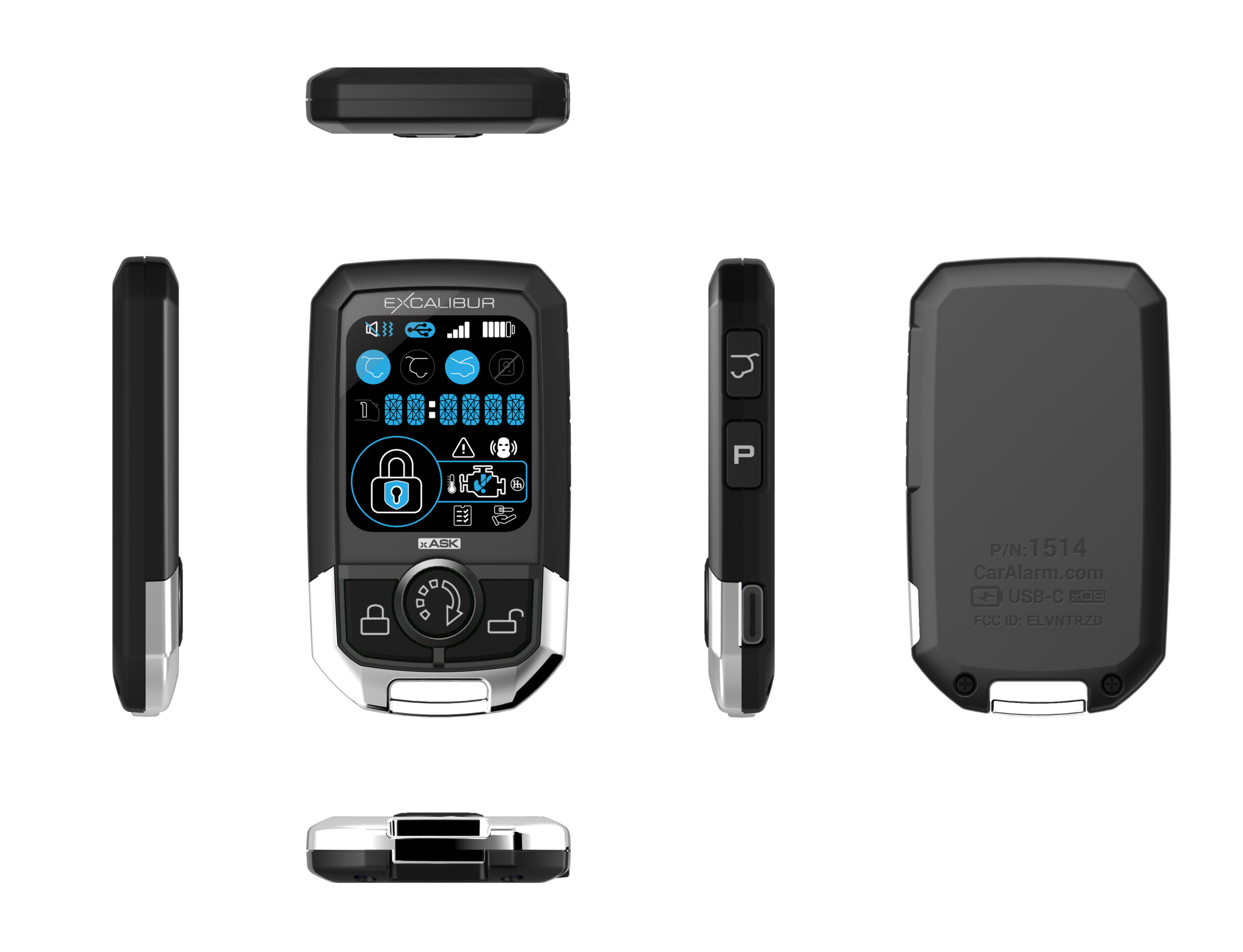
1514-03 – 5-button 2-way remote fob for Excalibur 80 series remote starts.

  • Only compatible with matching ASK 2-way antenna modules
    • REC-2N4A-3D
  • Slim, case for max comfort
  • Rechargeable battery (USB-C) – up to 90 days between charged!
  • Up to 1500ft of range
  • 1.6″ color LCD display for instant status at your fingertips

Operational Features

  • Multi-car operation. Control up to 2 different systems from one remote
  • Melody, vibrate, & mute modes
  • Supports 2-way only chirps for silent vehicle operation. NOTE: The main system must support the feature
    • AL-80
    • AL-80B
    • RS-80
    • RS-80B
  • Vehicle temp request
    • See the actual cabin temp. NOTE: The main system must support the feature
  • Shows engine run time in minutes:seconds
Product Specifications
Communication Type: 2-way
Frequency: 302MHz
Modulation: AM – ASK
Length: 3 inches
Width: 2 inches
Height: 0.5 inches
SKU: 151403
A parts list is not available for this product.

Reviews

There are no reviews yet.

Be the first to review “1514-03”

Your email address will not be published. Required fields are marked *